
Ganke Lee
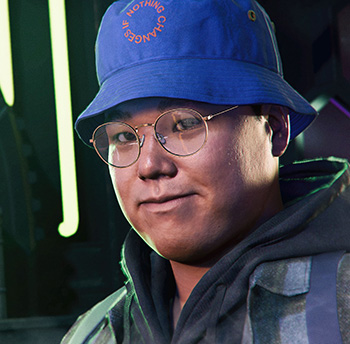
Ganke Lee’s Role and Personality
A Brooklyn Visions Academy student with a mind built for code, Ganke designed the Friendly Neighborhood Spider-App from scratch, giving Miles a real-time network of citizen-reported crime across the entire city. His brilliance is matched only by his self-deprecating humor – Miles himself has noted that Ganke genuinely struggles to accept credit for things he builds. That inability to take a compliment makes him oddly endearing; underneath all the technical wizardry is a teenager who just wants to help his best friend stay alive. In Spider-Man 2, his role expands significantly, with Ganke hijacking drones mid-mission and acting as both a strategic asset and the voice of reason when Miles needs grounding the most.
Who Voices Ganke Lee in Marvel’s Spider-Man 2?
Griffin Puatu brings Ganke to life with a warmth and naturalistic energy that makes the character feel like a genuine best friend rather than a plot device. Puatu is widely recognized in the voice acting world for his portrayal of Louis in the acclaimed anime Beastars, a role that required an entirely different emotional register and showcased his dramatic range. Johnny Lim provides both the motion capture performance and facial likeness for Ganke across the Insomniac Spider-Man series, grounding the character’s physical presence alongside Puatu’s vocal work.
Ganke Lee Voiced by
English

Japanese